Photo → match → done.
Point your phone at a minifigure or a set, tap the right match – that is
it. No account, no cloud, no subscription: Nupplo runs on a server of
your own, and the collection stays there.


The app speaks English. On first use it follows your browser language, and you can set it yourself under More → Settings → Language. The screenshots on this page come from a German installation – the buttons sit in the same places.
Hold the camera up to a minifigure or a set and Nupplo offers you the matching candidates. If you would rather type, search by number, name or appearance: “red protocol droid” puts R-3PO in the list.
Lay out a handful of figures side by side and photograph them in one go. Nupplo works through them one after another until none is left – you do not have to say in advance how many there are. Four clone troopers standing shoulder to shoulder take 1.2 seconds.
Describe what you see and Nupplo finds it: part and colour can be combined, so “figure with a blue hat, red legs and a green torso” lands on exactly the right one. German searches are covered by a built-in dictionary of around 1,400 entries that also copes with endings and compound words – of 103 real queries it answered 97 on its own. For the rest you can plug in an AI running on your own machine.
If you already keep a list, you do not have to retype it: a spreadsheet or a BrickLink inventory as CSV is enough, and the only column that really matters is the number. Anything already in the collection is merged rather than duplicated, and faulty rows are reported instead of quietly swallowed. Names, pictures and prices are fetched afterwards.
For every figure you see what it averages on BrickLink – new and used – and how that price has moved over time. This needs a BrickLink account – free, but with a shop opened once: the price interface is only open to sellers. You do not have to offer anything in it.
Shopping lists spread one total price proportionally across the individual figures, and there is a wanted list and an overview of duplicates. To look things up at the stall, take either a route to your server with you or the collection as a printed list.
Several people share one collection, each with their own login. Everyone can see what is already there – so nobody buys a second copy of something that has been on the shelf for months.
Off by default. Only if you want to, you connect your installation to others – and by invitation only. You get the invitation code from someone who is already taking part, and it works exactly once. Messages travel end-to-end encrypted through a small relay.
Whatever Nupplo stores sits on your server – there is no account with us, and the app sends nothing out on its own. That only changes if you want it to: when you join the trading network with an invitation. Even then only what you choose for it goes out – the items you offer, your profile and, if you switch it on, your wishlist. The collection itself never leaves your server, and leaving the network takes everything out again.
Nupplo runs in the browser, but it does not have to stay there. Chrome, Edge and Safari can install the page as an application: it then gets a window of its own without an address bar and its own icon in the Dock or the taskbar, and you start it like any other program.
In Chrome and Edge an install icon appears at the right-hand end of the address bar. In Safari: File → Add to Dock. Nupplo then sits with your other applications.
On a computer the navigation sits on the left with the collection in two columns beside it. On a phone it moves to the bottom and everything becomes a single column. It is the same app in two cuts.
The interface lives in your browser after the first load, the collection on your server. On the home network that is all you need; from outside, the way in leads through a VPN or a tunnel.

The same goes for phones: “Add to Home Screen” turns it into an app with its own icon. Handy when you want to check quickly at the flea market whether you already have a figure – for that, though, the app has to be reachable while you are out.
A small program of its own for Mac and Windows – made for auction streams. The seller holds a figure up to the camera, you drag a frame around it on your screen, and the match appears with its number, average prices and a “you already have this”. The frame is enough – no screenshot, no file.
It is a remote control for your Nupplo instance. On first start it signs in there with an address, username and password. That is where the collection, the lists and the prices come from, and that is where it books things. A running installation is therefore the prerequisite.
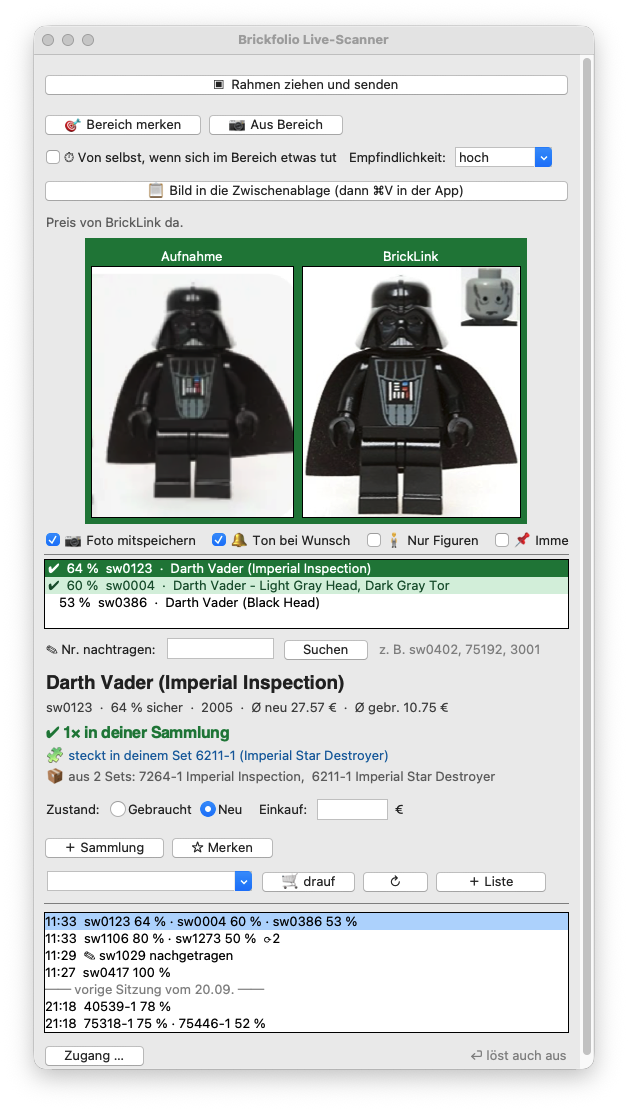
In a stream every second counts. One key press is enough; if you like, it triggers by itself as soon as a new figure appears in the area you marked.
Recognition returns a whole list with confidence scores, because with variants of the same figure the right one is often in second place. One click switches rows, and prices and picture follow along.
Straight from the match into the collection, the wanted list or a shopping list – through the same interface the browser uses. Only what you click gets booked.
There is a version for Mac and one for Windows, and it comes with everything it needs. New versions it fetches itself. It is a project of its own with its own releases.
Unlike the app itself, the scanner’s own window is in German only. The figures, numbers and prices it shows come from your instance and are unaffected.
Live Scanner on GitHub · Download the latest version · Setting it up and letting it through
Nupplo is a Docker image for x86-64 and arm64. It runs on a NAS, on an old computer, on a Raspberry Pi – or with a hosting provider, if nothing at home stays switched on. Most people use their NAS: it is running anyway, it sits on their own network, and the collection ends up where the photos already are.
It does not take much more than these few lines:
services:
  nupplo:
    image: melle79/nupplo:latest
    restart: unless-stopped
    ports: ["8300:8300"]
    volumes: ["./data:/data"]
docker compose up -d, then open
http://<machine>:8300. On a Synology the same route
runs through Container Manager – without a command
line.
On first start a wizard walks you through the rest: admin account, display name and the credentials for prices and catalogue search. Every step can be skipped and done later. The accounts at BrickLink and Rebrickable are free and remain yours.
Nupplo starts out reachable only on your own network. If you want to check at the flea market whether you already have a figure, you need a way in from outside: a Cloudflare Tunnel or a VPN. Both manage without opening a single port on the router – port forwarding puts your server in front of the whole internet and is not one of the options here.
For the tunnel there is a wizard in the app under More → External access that turns your token into a finished Compose block. The token stays in your browser while it does.
No account, no sign-up, no cloud: the collection sits as a file on a server of your own. Nobody can lock it, read along, or shut the service down one day – and a backup is simply a copy of that file.
Whatever is in the BrickLink and Rebrickable catalogues can be recorded: Star Wars just as much as City, Technic or the collectible series. No line has to be unlocked first.
No beta, no waiting list, no launch date: Nupplo has been running here daily since the summer and has been getting new versions ever since. Download it, start it, go.
There is no Nupplo cloud and no account with us. If you want to use the app, you run it yourself.
Nupplo sells nothing and brokers no purchases. Prices are points of reference from BrickLink, not a valuation.
Nupplo is a private hobby project and is neither sponsored nor authorised nor endorsed by the LEGO Group.